Announcement

Collapse
No announcement yet.

Technical issues in Campaign

Collapse
X
 
  • Filter
  • Time
  • Show
Clear All
new posts

  • #16
    Re: Campaign Isn't Even Worth The Trouble Anymore

    Originally posted by Kitalrez View Post
    1. What processor do you have and how fast it is in GHz. (Control Panel)
    2. How much RAM your system has in GB. (Control Panel)
    3. What kind of card you have, make/model. (Display adapter menu)
    4. How much onboard memory that card has in MB. (Display adapter menu)
    Ok im just gonna copy what i see, i have no idea what all this means but maybe you guys will lol.

    1. Intel(R) Core(TM)2 CPU T5200 @1.60GHz 1.60GHz 32Bit Operating System
    2. 2038 MB
    3. Mobile Intel(R) 945 GM Express Chipset Family
    4. I couldn't find this part

    My head hurts x-x lots of big words and numbers, but hope that helps
    62Dancer | 75Corsair | 75Beastmaster | 75Paladin | 75Bard


    Your resource for FFXI Farming

    Comment


    • #17
      Re: Technical issues in Campaign

      Sounds like your video card in your computer (that's the bit that makes the stuff appear on your screen) is being worked too hard/is too old to handle FFXI when there's a lot of things going on.

      Here's what I want you to do:

      From the Start menu, navigate:

      Start > Programs > PlayOnline > PlayOnline Viewer > PlayOnline Viewer Config

      You'll get a window that looks like this:


      Click on System Information.

      You'll get something that looks like this:


      Click on Copy to Clipboard.

      Now, reply to this thread, and in the text you would normally type, right click anywhere in the box and select Paste.

      It'll look like something like this:

      Originally posted by System Information
      =============================== System =================================

      CPU = Intel(R) Pentium(R) 4 Processor with MMX
      CPU Speed = 3004 MHz
      No. of CPUs = 2
      OS = Microsoft Windows XP Service Pack 2 Ver 5.01.2600
      Version of DirectX = DirectX9.0c
      Main Memory = Capacity:2047MB : Free Space:972MB
      Drive [C:] = Local Disk Free Space:37.04 GB(Capacity:111.80 GB)
      Drive [E:] = Local Disk Free Space:34.93 GB(Capacity:111.81 GB)
      PlayOnline Viewer Install Path = ElayOnlineSquareEnixPlayOnlineViewer
      FINAL FANTASY XI Install Path = ElayOnlineSquareEnixFINAL FANTASY XI
      TETRA MASTER Install Path = ElayOnlineSquareEnixTetraMaster
      Graphics Card = NVIDIA GeForce FX 5900XT
      Type of Chip = NVIDIA GeForce FX 5900XT
      Video Driver = nv4_disp.dll
      Version = 6.14.11.6344
      Updated = Friday, August 17, 2007 4:23 PM
      VendorId = 0x10DE
      DeviceId = 0x0332
      SubSysId = 0x310B1458
      Revision = 161
      VRAM = 128.0MB
      AvailableVidMem = 122.0MB
      AvailableTextureMem = 235.0MB
      Sound Card = Logitech USB Headset
      Sound Driver = usbaudio.sys
      Version = 5.1.2600.2180
      Updated = Wednesday, August 04, 2004 12:07 AM
      Network Card = Marvell Yukon 88E8001/8003/8010 PCI Gigabit Ethernet Controller
      Network Driver = yk51x86.sys
      Version = 7.21.1.3
      Updated = Thursday, August 19, 2004 8:21 AM
      Motherboard = P4P800SE
      Manufacturer = ASUSTeK Computer Inc.
      Version = Rev 2.xx
      Serial Number = MB-1234567890

      ============================ Registry ===================================

      HKEY_LOCAL_MACHINESOFTWAREPlayOnlineUS
      HKEY_LOCAL_MACHINESOFTWAREPlayOnlineUSInstallFolder
      HKEY_LOCAL_MACHINESOFTWAREPlayOnlineUSInstallFolder 0001 ElayOnlineSquareEnixFINAL FANTASY XI
      HKEY_LOCAL_MACHINESOFTWAREPlayOnlineUSInstallFolder 0002 ElayOnlineSquareEnixTetraMaster
      HKEY_LOCAL_MACHINESOFTWAREPlayOnlineUSInstallFolder 1000 ElayOnlineSquareEnixPlayOnlineViewer
      HKEY_LOCAL_MACHINESOFTWAREPlayOnlineUSInterface
      HKEY_LOCAL_MACHINESOFTWAREPlayOnlineUSInterface 0001 1542c6a5
      HKEY_LOCAL_MACHINESOFTWAREPlayOnlineUSInterface 0002 568fbba6
      HKEY_LOCAL_MACHINESOFTWAREPlayOnlineUSInterface 1000 568fbad2
      HKEY_LOCAL_MACHINESOFTWAREPlayOnlineUSSquareEnix
      HKEY_LOCAL_MACHINESOFTWAREPlayOnlineUSSquareEnixFinalFantasyXI
      HKEY_LOCAL_MACHINESOFTWAREPlayOnlineUSSquareEnixFinalFantasyXI bFirst 0
      HKEY_LOCAL_MACHINESOFTWAREPlayOnlineUSSquareEnixFinalFantasyXI 0000 0x00000000(0)
      HKEY_LOCAL_MACHINESOFTWAREPlayOnlineUSSquareEnixFinalFantasyXI 0001 0x00000000(0)
      HKEY_LOCAL_MACHINESOFTWAREPlayOnlineUSSquareEnixFinalFantasyXI 0002 0x00000000(0)
      HKEY_LOCAL_MACHINESOFTWAREPlayOnlineUSSquareEnixFinalFantasyXI 0003 0x00000000(0)
      HKEY_LOCAL_MACHINESOFTWAREPlayOnlineUSSquareEnixFinalFantasyXI 0004 0x00000000(0)
      HKEY_LOCAL_MACHINESOFTWAREPlayOnlineUSSquareEnixFinalFantasyXI 0007 0x00000001(1)
      HKEY_LOCAL_MACHINESOFTWAREPlayOnlineUSSquareEnixFinalFantasyXI 0011 0x00000000(0)
      HKEY_LOCAL_MACHINESOFTWAREPlayOnlineUSSquareEnixFinalFantasyXI 0017 0x00000000(0)
      HKEY_LOCAL_MACHINESOFTWAREPlayOnlineUSSquareEnixFinalFantasyXI 0018 0x00000002(2)
      HKEY_LOCAL_MACHINESOFTWAREPlayOnlineUSSquareEnixFinalFantasyXI 0019 0x00000001(1)
      HKEY_LOCAL_MACHINESOFTWAREPlayOnlineUSSquareEnixFinalFantasyXI 0020 0x00000001(1)
      HKEY_LOCAL_MACHINESOFTWAREPlayOnlineUSSquareEnixFinalFantasyXI 0021 0x00000001(1)
      HKEY_LOCAL_MACHINESOFTWAREPlayOnlineUSSquareEnixFinalFantasyXI 0022 0x00000000(0)
      HKEY_LOCAL_MACHINESOFTWAREPlayOnlineUSSquareEnixFinalFantasyXI 0023 0x00000001(1)
      HKEY_LOCAL_MACHINESOFTWAREPlayOnlineUSSquareEnixFinalFantasyXI 0024 0x00000000(0)
      HKEY_LOCAL_MACHINESOFTWAREPlayOnlineUSSquareEnixFinalFantasyXI 0028 0x00000000(0)
      HKEY_LOCAL_MACHINESOFTWAREPlayOnlineUSSquareEnixFinalFantasyXI 0029 0x0000000f(15)
      HKEY_LOCAL_MACHINESOFTWAREPlayOnlineUSSquareEnixFinalFantasyXI 0030 0x00000000(0)
      HKEY_LOCAL_MACHINESOFTWAREPlayOnlineUSSquareEnixFinalFantasyXI 0031 0x000000a6(166)
      HKEY_LOCAL_MACHINESOFTWAREPlayOnlineUSSquareEnixFinalFantasyXI 0032 0x00000000(0)
      HKEY_LOCAL_MACHINESOFTWAREPlayOnlineUSSquareEnixFinalFantasyXI 0033 0x00000000(0)
      HKEY_LOCAL_MACHINESOFTWAREPlayOnlineUSSquareEnixFinalFantasyXI padsin000 4,6,11,7,10,1,3,2,0,8,-1,-1,9,33,33,32,32,34,34,37,37,41,41,40,40,5,-1
      HKEY_LOCAL_MACHINESOFTWAREPlayOnlineUSSquareEnixFinalFantasyXI padmode000 1,0,1,1
      HKEY_LOCAL_MACHINESOFTWAREPlayOnlineUSSquareEnixFinalFantasyXI 0034 0x00000000(0)
      HKEY_LOCAL_MACHINESOFTWAREPlayOnlineUSSquareEnixPlayOnlineViewer
      HKEY_LOCAL_MACHINESOFTWAREPlayOnlineUSSquareEnixPlayOnlineViewer FirstBootPlayMovie 0x00000000(0)
      HKEY_LOCAL_MACHINESOFTWAREPlayOnlineUSSquareEnixPlayOnlineViewerSettings
      HKEY_LOCAL_MACHINESOFTWAREPlayOnlineUSSquareEnixPlayOnlineViewerSettings ResetSettings 0x00000000(0)
      HKEY_LOCAL_MACHINESOFTWAREPlayOnlineUSSquareEnixPlayOnlineViewerSettings PlayOpeningMovie 0x00000000(0)
      HKEY_LOCAL_MACHINESOFTWAREPlayOnlineUSSquareEnixPlayOnlineViewerSettings FullScreen 0x00000000(0)
      HKEY_LOCAL_MACHINESOFTWAREPlayOnlineUSSquareEnixPlayOnlineViewerSettings PlayAudio 0x00000001(1)
      HKEY_LOCAL_MACHINESOFTWAREPlayOnlineUSSquareEnixPlayOnlineViewerSettings UseGameController 0x00000001(1)
      HKEY_LOCAL_MACHINESOFTWAREPlayOnlineUSSquareEnixPlayOnlineViewerSettings WindowX 0x000000fb(251)
      HKEY_LOCAL_MACHINESOFTWAREPlayOnlineUSSquareEnixPlayOnlineViewerSettings WindowY 0x00000000(0)
      HKEY_LOCAL_MACHINESOFTWAREPlayOnlineUSSquareEnixPlayOnlineViewerSettings WindowW 0x00000080(128)
      HKEY_LOCAL_MACHINESOFTWAREPlayOnlineUSSquareEnixPlayOnlineViewerSettings WindowH 0x000000e0(224)
      HKEY_LOCAL_MACHINESOFTWAREPlayOnlineUSSquareEnixPlayOnlineViewerSettingsController
      HKEY_LOCAL_MACHINESOFTWAREPlayOnlineUSSquareEnixPlayOnlineViewerSettingsController AnchorUp 0x00000023(35)
      HKEY_LOCAL_MACHINESOFTWAREPlayOnlineUSSquareEnixPlayOnlineViewerSettingsController AnchorRight 0x00000020(32)
      HKEY_LOCAL_MACHINESOFTWAREPlayOnlineUSSquareEnixPlayOnlineViewerSettingsController AnchorLeft 0x00000021(33)
      HKEY_LOCAL_MACHINESOFTWAREPlayOnlineUSSquareEnixPlayOnlineViewerSettingsController AnchorDown 0x00000022(34)
      HKEY_LOCAL_MACHINESOFTWAREPlayOnlineUSSquareEnixPlayOnlineViewerSettingsController ChrCsrNext 0x00000007(7)
      HKEY_LOCAL_MACHINESOFTWAREPlayOnlineUSSquareEnixPlayOnlineViewerSettingsController ChrCsrPrev 0x00000006(6)
      HKEY_LOCAL_MACHINESOFTWAREPlayOnlineUSSquareEnixPlayOnlineViewerSettingsController PageNext 0x00000005(5)
      HKEY_LOCAL_MACHINESOFTWAREPlayOnlineUSSquareEnixPlayOnlineViewerSettingsController PagePrev 0x00000004(4)
      HKEY_LOCAL_MACHINESOFTWAREPlayOnlineUSSquareEnixPlayOnlineViewerSettingsController Navi 0x00000003(3)
      HKEY_LOCAL_MACHINESOFTWAREPlayOnlineUSSquareEnixPlayOnlineViewerSettingsController Menu 0x00000001(1)
      HKEY_LOCAL_MACHINESOFTWAREPlayOnlineUSSquareEnixPlayOnlineViewerSettingsController Ok 0x00000002(2)
      HKEY_LOCAL_MACHINESOFTWAREPlayOnlineUSSquareEnixPlayOnlineViewerSettingsController Cancel 0x00000000(0)
      HKEY_LOCAL_MACHINESOFTWAREPlayOnlineUSSquareEnixPlayOnlineViewerSettingsController ID 0x00000000(0)
      HKEY_LOCAL_MACHINESOFTWAREPlayOnlineUSSquareEnixPlayOnlineViewerSystemInfo
      HKEY_LOCAL_MACHINESOFTWAREPlayOnlineUSSquareEnixPlayOnlineViewerSystemInfoQCheck
      HKEY_LOCAL_MACHINESOFTWAREPlayOnlineUSSquareEnixTetraMaster
      HKEY_LOCAL_MACHINESOFTWAREPlayOnlineUSSquareEnixTetraMaster LOADDIR ElayOnlineSquareEnix/TetraMaster/
      HKEY_LOCAL_MACHINESOFTWAREClassesCLSID{E636B693-A5A7-4161-9F02-D769178DE989}
      HKEY_LOCAL_MACHINESOFTWAREClassesCLSID{E636B693-A5A7-4161-9F02-D769178DE989} FFXiVersion Class
      HKEY_LOCAL_MACHINESOFTWAREClassesCLSID{E636B693-A5A7-4161-9F02-D769178DE989}InprocServer32
      HKEY_LOCAL_MACHINESOFTWAREClassesCLSID{E636B693-A5A7-4161-9F02-D769178DE989}InprocServer32 ElayOnlineSquareEnixFINAL FANTASY XIFFXiVersions.dll
      HKEY_LOCAL_MACHINESOFTWAREClassesCLSID{E636B693-A5A7-4161-9F02-D769178DE989}InprocServer32 ThreadingModel Apartment
      HKEY_LOCAL_MACHINESOFTWAREClassesCLSID{E636B693-A5A7-4161-9F02-D769178DE989}ProgID
      HKEY_LOCAL_MACHINESOFTWAREClassesCLSID{E636B693-A5A7-4161-9F02-D769178DE989}ProgID FFXiVersions.FFXiVersion.1
      HKEY_LOCAL_MACHINESOFTWAREClassesCLSID{E636B693-A5A7-4161-9F02-D769178DE989}TypeLib
      HKEY_LOCAL_MACHINESOFTWAREClassesCLSID{E636B693-A5A7-4161-9F02-D769178DE989}TypeLib {75AA93EE-48B1-4A54-B570-6E717178C49F}
      HKEY_LOCAL_MACHINESOFTWAREClassesCLSID{E636B693-A5A7-4161-9F02-D769178DE989}VersionIndependentProgID
      HKEY_LOCAL_MACHINESOFTWAREClassesCLSID{E636B693-A5A7-4161-9F02-D769178DE989}VersionIndependentProgID FFXiVersions.FFXiVersion
      HKEY_LOCAL_MACHINESOFTWAREClassesFFXiVersions.FFXiVersion
      HKEY_LOCAL_MACHINESOFTWAREClassesFFXiVersions.FFXiVersion FFXiVersion Class
      HKEY_LOCAL_MACHINESOFTWAREClassesFFXiVersions.FFXiVersionCLSID
      HKEY_LOCAL_MACHINESOFTWAREClassesFFXiVersions.FFXiVersionCLSID {E636B693-A5A7-4161-9F02-D769178DE989}
      HKEY_LOCAL_MACHINESOFTWAREClassesFFXiVersions.FFXiVersionCurVer
      HKEY_LOCAL_MACHINESOFTWAREClassesFFXiVersions.FFXiVersionCurVer FFXiVersions.FFXiVersion.1
      HKEY_LOCAL_MACHINESOFTWAREClassesFFXiVersions.FFXiVersion.1
      HKEY_LOCAL_MACHINESOFTWAREClassesFFXiVersions.FFXiVersion.1 FFXiVersion Class
      HKEY_LOCAL_MACHINESOFTWAREClassesFFXiVersions.FFXiVersion.1CLSID
      HKEY_LOCAL_MACHINESOFTWAREClassesFFXiVersions.FFXiVersion.1CLSID {E636B693-A5A7-4161-9F02-D769178DE989}

      ============================ Applications ==============================

      Technical issues in Campaign - Final Fantasy XI :: Dreams in Vana'diel :: Community - Opera
      IRC - GameSurge
      DATA (E
      My Computer
      Trillian
      screenshots
      Calculator
      Storage Pics

      ============================== Processes ===============================

      smss.exe
      winlogon.exe
      services.exe
      lsass.exe
      svchost.exe
      svchost.exe
      spoolsv.exe
      CTsvcCDA.exe
      mdm.exe
      nvsvc32.exe
      svchost.exe
      MediaServer.exe
      MsPMSPSv.exe
      Explorer.EXE
      jusched.exe
      DrgToDsc.exe
      iTunesHelper.exe
      iPodService.exe
      RUNDLL32.EXE
      QTTask.exe
      msmsgs.exe
      ctfmon.exe
      wuauclt.exe
      jucheck.exe
      trillian.exe
      IEXPLORE.EXE
      calc.exe
      IEXPLORE.EXE
      Opera.exe
      MSACCESS.EXE
      winamp.exe
      polcfg.exe

      ========================= Installed Programs ===========================

      Adobe Flash Player ActiveX
      Adobe Flash Player Plugin
      Audacity 1.2.4
      CCleaner (remove only)
      Combined Community Codec Pack 2006-07-28 (Remove Only)
      ffdshow [rev 1324] [2007-07-01]
      InfoRapid Search & Replace
      FINAL FANTASY XI: Chains of Promathia
      PlayOnline Viewer and Tetra Master
      iTunes
      FINAL FANTASY XI: Wings of the Goddess
      FINAL FANTASY XI
      FINAL FANTASY XI: Rise of the Zilart
      FINAL FANTASY XI: Treasures of Aht Urhgan
      CryENGINE MOD SDK for FarCry v1.33
      Windows XP Hotfix - KB873339
      Windows XP Hotfix - KB885250
      Windows XP Hotfix - KB885835
      Windows XP Hotfix - KB885836
      Windows XP Hotfix - KB885884
      Windows XP Hotfix - KB886185
      Windows XP Hotfix - KB887472
      Windows XP Hotfix - KB887742
      Windows XP Hotfix - KB888113
      Windows XP Hotfix - KB888302
      Security Update for Windows XP (KB890046)
      Windows XP Hotfix - KB890859
      Windows XP Hotfix - KB891781
      Security Update for Windows XP (KB893066)
      Security Update for Windows XP (KB893756)
      Windows Installer 3.1 (KB893803)
      Update for Windows XP (KB894391)
      Security Update for Windows XP (KB896358)
      Security Update for Windows XP (KB896422)
      Security Update for Windows XP (KB896423)
      Security Update for Windows XP (KB896424)
      Security Update for Windows XP (KB896428)
      Update for Windows XP (KB898461)
      Security Update for Windows XP (KB899587)
      Security Update for Windows XP (KB899589)
      Security Update for Windows XP (KB899591)
      Update for Windows XP (KB900485)
      Security Update for Windows XP (KB900725)
      Security Update for Windows XP (KB901017)
      Security Update for Windows XP (KB901214)
      Security Update for Windows XP (KB902400)
      Security Update for Windows XP (KB904706)
      Security Update for Windows XP (KB905414)
      Security Update for Windows XP (KB905749)
      Security Update for Windows XP (KB905915)
      Security Update for Windows XP (KB908519)
      Security Update for Windows XP (KB908531)
      Update for Windows XP (KB910437)
      Security Update for Windows XP (KB911280)
      Security Update for Windows XP (KB911562)
      Security Update for Windows Media Player (KB911564)
      Security Update for Windows Media Player 9 (KB911565)
      Security Update for Windows XP (KB911567)
      Security Update for Windows XP (KB911927)
      Security Update for Windows XP (KB912812)
      Security Update for Windows XP (KB912919)
      Security Update for Windows XP (KB913446)
      Security Update for Windows XP (KB913580)
      Security Update for Windows XP (KB914388)
      Security Update for Windows XP (KB914389)
      Security Update for Windows XP (KB916281)
      Update for Windows XP (KB916595)
      Security Update for Windows XP (KB917159)
      Security Update for Windows XP (KB917344)
      Security Update for Windows XP (KB917422)
      Security Update for Windows Media Player 10 (KB917734)
      Security Update for Windows Media Player 9 (KB917734)
      Security Update for Windows XP (KB917953)
      Security Update for Windows XP (KB918118)
      Security Update for Windows XP (KB918439)
      Security Update for Windows XP (KB918899)
      Security Update for Windows XP (KB919007)
      Security Update for Windows XP (KB920213)
      Security Update for Windows XP (KB920214)
      Security Update for Windows XP (KB920670)
      Security Update for Windows XP (KB920683)
      Security Update for Windows XP (KB920685)
      Update for Windows XP (KB920872)
      Security Update for Windows XP (KB921398)
      Security Update for Windows XP (KB921503)
      Security Update for Windows XP (KB921883)
      Update for Windows XP (KB922582)
      Security Update for Windows XP (KB922616)
      Security Update for Windows XP (KB922760)
      Security Update for Windows XP (KB922819)
      Security Update for Windows XP (KB923191)
      Security Update for Windows XP (KB923414)
      Security Update for Windows XP (KB923689)
      Security Update for Windows XP (KB923694)
      Security Update for Windows XP (KB923980)
      Security Update for Windows XP (KB924191)
      Security Update for Windows XP (KB924270)
      Security Update for Windows XP (KB924496)
      Security Update for Windows XP (KB924667)
      Security Update for Windows Media Player 6.4 (KB925398)
      Security Update for Windows XP (KB925454)
      Security Update for Windows XP (KB925486)
      Security Update for Windows XP (KB925902)
      Hotfix for Windows XP (KB926239)
      Security Update for Windows XP (KB926255)
      Security Update for Windows XP (KB926436)
      Security Update for Windows XP (KB927779)
      Security Update for Windows XP (KB927802)
      Update for Windows XP (KB927891)
      Security Update for Windows XP (KB928090)
      Security Update for Windows XP (KB928255)
      Security Update for Microsoft .NET Framework 2.0 (KB928365)
      Security Update for Windows XP (KB928843)
      Security Update for Windows XP (KB929123)
      Update for Windows XP (KB929338)
      Hotfix for Windows Media Format 11 SDK (KB929399)
      Security Update for Windows XP (KB929969)
      Security Update for Windows XP (KB930178)
      Update for Windows XP (KB930916)
      Security Update for Windows XP (KB931261)
      Security Update for Windows XP (KB931768)
      Security Update for Windows XP (KB931784)
      Update for Windows XP (KB931836)
      Security Update for Windows XP (KB932168)
      Update for Windows XP (KB933360)
      Security Update for Windows XP (KB933566)
      Security Update for Windows XP (KB933729)
      Security Update for Windows XP (KB935839)
      Security Update for Windows XP (KB935840)
      Security Update for Windows XP (KB936021)
      Update for Windows XP (KB936357)
      Security Update for Windows Media Player 11 (KB936782)
      Security Update for Windows XP (KB937143)
      Security Update for Windows XP (KB937894)
      Security Update for Windows XP (KB938127)
      Update for Windows XP (KB938828)
      Security Update for Windows XP (KB938829)
      Security Update for Windows XP (KB939653)
      Hotfix for Windows Media Player 11 (KB939683)
      Security Update for Windows XP (KB941202)
      Security Update for Windows XP (KB941568)
      Security Update for Windows XP (KB941569)
      Security Update for Windows XP (KB941644)
      Security Update for Windows XP (KB942615)
      Update for Windows XP (KB942763)
      Update for Windows XP (KB942840)
      Security Update for Windows XP (KB943055)
      Security Update for Windows XP (KB943460)
      Security Update for Windows XP (KB943485)
      Security Update for Windows XP (KB944533)
      Security Update for Windows XP (KB944653)
      Security Update for Windows XP (KB946026)
      Update for Windows XP (KB946627)
      Microsoft .NET Framework 1.1 Hotfix (KB928366)
      Macromedia Shockwave Player
      Microsoft .NET Framework 1.1
      Microsoft .NET Framework 2.0
      Matroska Pack - Lazy Man's MKV 0.9.9
      Microsoft Compression Client Pack 1.0 for Windows XP
      NVIDIA Drivers
      Direct Show Ogg Vorbis Filter (remove only)
      PS3 Video 9 2.25
      PSP Video 9 2.25
      PSPad editor
      Macromedia Flash Player 8
      StepMania (remove only)
      Creative System Information
      The Ur-Quan Masters 0.6.2
      Trillian
      TVersity Codec Pack 1.1
      TVersity Media Server 0.9.10.8a beta
      TVersity Media Server 0.9.11.4 beta
      Unreal Tournament 2004
      Microsoft Visual Studio .NET Enterprise Developer 2003 - English
      VideoLAN VLC media player 0.8.6b
      Windows Genuine Advantage Notifications (KB905474)
      Winamp (remove only)
      Windows Media Format 11 runtime
      Windows Media Player 11
      GIMP 2.4.2
      WinRAR archiver
      Microsoft User-Mode Driver Framework Feature Pack 1.0
      Microsoft Office 2000 SR-1 Professional
      OpenOffice.org 2.0
      Microsoft FrontPage Client - English
      AutoUpdate
      Microsoft Visual J# .NET Redistributable Package 1.1
      J2SE Runtime Environment 5.0 Update 6
      J2SE Runtime Environment 5.0 Update 9
      J2SE Runtime Environment 5.0 Update 10
      Java(TM) SE Runtime Environment 6 Update 1
      Java(TM) 6 Update 2
      Java(TM) 6 Update 3
      AGEIA PhysX v7.09.13
      Easy CD & DVD Creator 6
      MSDN Library for Visual Studio .NET 2003
      USB Dual Vibration Joystick
      Visual Studio .NET Enterprise Developer 2003 - English
      Microsoft Visual C++ 2005 Redistributable
      Sound Blaster Live! 24-bit
      Ventrilo
      DivX Codec
      DivX Player
      Opera 9.26
      Adobe Reader 8.1.2
      Japanese Fonts Support For Adobe Reader 8
      DivX Converter
      DivX Web Player
      Apple Software Update
      Roxio DVDMax Player
      Unreal Tournament 3
      Marvell Miniport Driver
      DivX Content Uploader
      Visual Studio.NET Baseline - English
      QuickTime

      ========================== Connection Test ============================

      Not Checked

      Icemage

      Comment


      • #18
        Re: Technical issues in Campaign

        Ok heres the system specs thing, maybe this might help a little:


        Oh, and here you go Icemage:

        =============================== System =================================

        CPU = Unknown Genuine Intel(R) Processor with MMX
        CPU Speed = 1599 MHz
        No. of CPUs = 2
        OS = Microsoft Windows Vista Ver 6.00.6000
        Version of DirectX = DirectX10.0
        Main Memory = Capacity:2037MB : Free Space:1179MB
        Drive [C:\] = Local Disk Free Space:85.82 GB(Capacity:139.38 GB)
        Drive [D:\] = Local Disk Free Space:5.64 GB(Capacity:9.67 GB)
        PlayOnline Viewer Install Path = C:\Program Files\PlayOnline\SquareEnix\PlayOnlineViewer\
        FINAL FANTASY XI Install Path = C:\Program Files\PlayOnline\SquareEnix\FINAL FANTASY XI\
        TETRA MASTER Install Path = C:\Program Files\PlayOnline\SquareEnix\TetraMaster\
        Graphics Card = Mobile Intel(R) 945GM Express Chipset Family
        Type of Chip = UnKnown Video Chip
        Video Driver = igdumd32.dll
        Version = 7.14.10.1147
        Updated = Tuesday, December 12, 2006 12:50 PM
        VendorId = 0x8086
        DeviceId = 0x27A2
        SubSysId = 0x366107B
        Revision = 3
        VRAM =
        AvailableVidMem = 32.0MB
        AvailableTextureMem = 223.0MB
        Sound Card = Speakers (SigmaTel High Definition Audio CODEC)
        Sound Driver = {0.0.0.00000000}.{8c2807f3-9697-4d05-9f82-c3c82bad275c}
        Version =
        Updated =
        Motherboard =
        Manufacturer = Gateway
        Version = 77.09
        Serial Number = QTFAJJ65214792

        ============================ Registry ===================================

        \HKEY_LOCAL_MACHINE\SOFTWARE\PlayOnlineUS
        \HKEY_LOCAL_MACHINE\SOFTWARE\PlayOnlineUS CommonFilesFolder C:\Program Files\Common Files\
        \HKEY_LOCAL_MACHINE\SOFTWARE\PlayOnlineUS\InstallFolder
        \HKEY_LOCAL_MACHINE\SOFTWARE\PlayOnlineUS\InstallFolder 1000 C:\Program Files\PlayOnline\SquareEnix\PlayOnlineViewer
        \HKEY_LOCAL_MACHINE\SOFTWARE\PlayOnlineUS\InstallFolder 0002 C:\Program Files\PlayOnline\SquareEnix\TetraMaster
        \HKEY_LOCAL_MACHINE\SOFTWARE\PlayOnlineUS\InstallFolder 0001 C:\Program Files\PlayOnline\SquareEnix\FINAL FANTASY XI\
        \HKEY_LOCAL_MACHINE\SOFTWARE\PlayOnlineUS\Interface
        \HKEY_LOCAL_MACHINE\SOFTWARE\PlayOnlineUS\Interface 0002 02183c8e
        \HKEY_LOCAL_MACHINE\SOFTWARE\PlayOnlineUS\Interface 1000 02183c46
        \HKEY_LOCAL_MACHINE\SOFTWARE\PlayOnlineUS\Interface 0001 027b0ffa
        \HKEY_LOCAL_MACHINE\SOFTWARE\PlayOnlineUS\SquareEnix
        \HKEY_LOCAL_MACHINE\SOFTWARE\PlayOnlineUS\SquareEnix\FinalFantasyXI
        \HKEY_LOCAL_MACHINE\SOFTWARE\PlayOnlineUS\SquareEnix\FinalFantasyXI 0000 0x00000001(1)
        \HKEY_LOCAL_MACHINE\SOFTWARE\PlayOnlineUS\SquareEnix\FinalFantasyXI 0001 0x00000020(32)
        \HKEY_LOCAL_MACHINE\SOFTWARE\PlayOnlineUS\SquareEnix\FinalFantasyXI 0002 0x00000058(88)
        \HKEY_LOCAL_MACHINE\SOFTWARE\PlayOnlineUS\SquareEnix\FinalFantasyXI 0003 0x00000000(0)
        \HKEY_LOCAL_MACHINE\SOFTWARE\PlayOnlineUS\SquareEnix\FinalFantasyXI 0004 0x00000000(0)
        \HKEY_LOCAL_MACHINE\SOFTWARE\PlayOnlineUS\SquareEnix\FinalFantasyXI 0007 0x00000001(1)
        \HKEY_LOCAL_MACHINE\SOFTWARE\PlayOnlineUS\SquareEnix\FinalFantasyXI 0011 0x00000000(0)
        \HKEY_LOCAL_MACHINE\SOFTWARE\PlayOnlineUS\SquareEnix\FinalFantasyXI 0017 0x00000000(0)
        \HKEY_LOCAL_MACHINE\SOFTWARE\PlayOnlineUS\SquareEnix\FinalFantasyXI 0018 0x00000002(2)
        \HKEY_LOCAL_MACHINE\SOFTWARE\PlayOnlineUS\SquareEnix\FinalFantasyXI 0019 0x00000001(1)
        \HKEY_LOCAL_MACHINE\SOFTWARE\PlayOnlineUS\SquareEnix\FinalFantasyXI 0020 0x00000001(1)
        \HKEY_LOCAL_MACHINE\SOFTWARE\PlayOnlineUS\SquareEnix\FinalFantasyXI 0021 0x00000001(1)
        \HKEY_LOCAL_MACHINE\SOFTWARE\PlayOnlineUS\SquareEnix\FinalFantasyXI 0022 0x00000000(0)
        \HKEY_LOCAL_MACHINE\SOFTWARE\PlayOnlineUS\SquareEnix\FinalFantasyXI 0023 0x00000000(0)
        \HKEY_LOCAL_MACHINE\SOFTWARE\PlayOnlineUS\SquareEnix\FinalFantasyXI 0024 0x00000000(0)
        \HKEY_LOCAL_MACHINE\SOFTWARE\PlayOnlineUS\SquareEnix\FinalFantasyXI 0028 0x00000000(0)
        \HKEY_LOCAL_MACHINE\SOFTWARE\PlayOnlineUS\SquareEnix\FinalFantasyXI 0029 0x0000000c(12)
        \HKEY_LOCAL_MACHINE\SOFTWARE\PlayOnlineUS\SquareEnix\FinalFantasyXI 0030 0x00000000(0)
        \HKEY_LOCAL_MACHINE\SOFTWARE\PlayOnlineUS\SquareEnix\FinalFantasyXI 0031 0x000000a6(166)
        \HKEY_LOCAL_MACHINE\SOFTWARE\PlayOnlineUS\SquareEnix\FinalFantasyXI 0032 0x00000000(0)
        \HKEY_LOCAL_MACHINE\SOFTWARE\PlayOnlineUS\SquareEnix\FinalFantasyXI 0033 0x00000000(0)
        \HKEY_LOCAL_MACHINE\SOFTWARE\PlayOnlineUS\SquareEnix\FinalFantasyXI padsin000 -1,4,9,5,8,1,2,0,3,6,-1,-1,7,33,33,32,32,-35,36,35,35,41,41,40,40,-1,-1
        \HKEY_LOCAL_MACHINE\SOFTWARE\PlayOnlineUS\SquareEnix\FinalFantasyXI padmode000 1,1,1,1
        \HKEY_LOCAL_MACHINE\SOFTWARE\PlayOnlineUS\SquareEnix\FinalFantasyXI 0034 0x00000001(1)
        \HKEY_LOCAL_MACHINE\SOFTWARE\PlayOnlineUS\SquareEnix\PlayOnlineViewer
        \HKEY_LOCAL_MACHINE\SOFTWARE\PlayOnlineUS\SquareEnix\PlayOnlineViewer FirstBootPlayMovie 0x00000000(0)
        \HKEY_LOCAL_MACHINE\SOFTWARE\PlayOnlineUS\SquareEnix\PlayOnlineViewer\Settings
        \HKEY_LOCAL_MACHINE\SOFTWARE\PlayOnlineUS\SquareEnix\PlayOnlineViewer\Settings UseGameController 0x00000000(0)
        \HKEY_LOCAL_MACHINE\SOFTWARE\PlayOnlineUS\SquareEnix\PlayOnlineViewer\Settings WindowH 0x000000e9(233)
        \HKEY_LOCAL_MACHINE\SOFTWARE\PlayOnlineUS\SquareEnix\PlayOnlineViewer\Settings ResetSettings 0x00000000(0)
        \HKEY_LOCAL_MACHINE\SOFTWARE\PlayOnlineUS\SquareEnix\PlayOnlineViewer\Settings SupportLanguage 0x00000001(1)
        \HKEY_LOCAL_MACHINE\SOFTWARE\PlayOnlineUS\SquareEnix\PlayOnlineViewer\Settings WindowW 0x0000008c(140)
        \HKEY_LOCAL_MACHINE\SOFTWARE\PlayOnlineUS\SquareEnix\PlayOnlineViewer\Settings PlayAudio 0x00000001(1)
        \HKEY_LOCAL_MACHINE\SOFTWARE\PlayOnlineUS\SquareEnix\PlayOnlineViewer\Settings PlayOpeningMovie 0x00000001(1)
        \HKEY_LOCAL_MACHINE\SOFTWARE\PlayOnlineUS\SquareEnix\PlayOnlineViewer\Settings FullScreen 0x00000000(0)
        \HKEY_LOCAL_MACHINE\SOFTWARE\PlayOnlineUS\SquareEnix\PlayOnlineViewer\Settings Language 0x00000001(1)
        \HKEY_LOCAL_MACHINE\SOFTWARE\PlayOnlineUS\SquareEnix\PlayOnlineViewer\Settings WindowX 0x00000055(85)
        \HKEY_LOCAL_MACHINE\SOFTWARE\PlayOnlineUS\SquareEnix\PlayOnlineViewer\Settings WindowY 0x00000035(53)
        \HKEY_LOCAL_MACHINE\SOFTWARE\PlayOnlineUS\SquareEnix\PlayOnlineViewer\Settings\Controller
        \HKEY_LOCAL_MACHINE\SOFTWARE\PlayOnlineUS\SquareEnix\PlayOnlineViewer\Settings\Controller ChrCsrNext 0x00000007(7)
        \HKEY_LOCAL_MACHINE\SOFTWARE\PlayOnlineUS\SquareEnix\PlayOnlineViewer\Settings\Controller AnchorLeft 0x00000036(54)
        \HKEY_LOCAL_MACHINE\SOFTWARE\PlayOnlineUS\SquareEnix\PlayOnlineViewer\Settings\Controller AnchorUp 0x00000030(48)
        \HKEY_LOCAL_MACHINE\SOFTWARE\PlayOnlineUS\SquareEnix\PlayOnlineViewer\Settings\Controller Menu 0x00000000(0)
        \HKEY_LOCAL_MACHINE\SOFTWARE\PlayOnlineUS\SquareEnix\PlayOnlineViewer\Settings\Controller ID 0x00000000(0)
        \HKEY_LOCAL_MACHINE\SOFTWARE\PlayOnlineUS\SquareEnix\PlayOnlineViewer\Settings\Controller AnchorDown 0x00000034(52)
        \HKEY_LOCAL_MACHINE\SOFTWARE\PlayOnlineUS\SquareEnix\PlayOnlineViewer\Settings\Controller Ok 0x00000001(1)
        \HKEY_LOCAL_MACHINE\SOFTWARE\PlayOnlineUS\SquareEnix\PlayOnlineViewer\Settings\Controller Navi 0x00000003(3)
        \HKEY_LOCAL_MACHINE\SOFTWARE\PlayOnlineUS\SquareEnix\PlayOnlineViewer\Settings\Controller Cancel 0x00000002(2)
        \HKEY_LOCAL_MACHINE\SOFTWARE\PlayOnlineUS\SquareEnix\PlayOnlineViewer\Settings\Controller PageNext 0x00000005(5)
        \HKEY_LOCAL_MACHINE\SOFTWARE\PlayOnlineUS\SquareEnix\PlayOnlineViewer\Settings\Controller ChrCsrPrev 0x00000006(6)
        \HKEY_LOCAL_MACHINE\SOFTWARE\PlayOnlineUS\SquareEnix\PlayOnlineViewer\Settings\Controller AnchorRight 0x00000032(50)
        \HKEY_LOCAL_MACHINE\SOFTWARE\PlayOnlineUS\SquareEnix\PlayOnlineViewer\Settings\Controller PagePrev 0x00000004(4)
        \HKEY_LOCAL_MACHINE\SOFTWARE\PlayOnlineUS\SquareEnix\PlayOnlineViewer\SystemInfo
        \HKEY_LOCAL_MACHINE\SOFTWARE\PlayOnlineUS\SquareEnix\PlayOnlineViewer\SystemInfo\QCheck
        \HKEY_LOCAL_MACHINE\SOFTWARE\PlayOnlineUS\SquareEnix\TetraMaster
        \HKEY_LOCAL_MACHINE\SOFTWARE\PlayOnlineUS\SquareEnix\TetraMaster B_06FRIENDLIST 0x00000004(4)
        \HKEY_LOCAL_MACHINE\SOFTWARE\PlayOnlineUS\SquareEnix\TetraMaster SOUND 0x00000001(1)
        \HKEY_LOCAL_MACHINE\SOFTWARE\PlayOnlineUS\SquareEnix\TetraMaster B_07MENU 0x00000001(1)
        \HKEY_LOCAL_MACHINE\SOFTWARE\PlayOnlineUS\SquareEnix\TetraMaster PAD 0x00000000(0)
        \HKEY_LOCAL_MACHINE\SOFTWARE\PlayOnlineUS\SquareEnix\TetraMaster LOADDIR C:\Program Files\PlayOnline\SquareEnix/TetraMaster/
        \HKEY_LOCAL_MACHINE\SOFTWARE\PlayOnlineUS\SquareEnix\TetraMaster JOYPADGUIDENABLE 0x00000001(1)
        \HKEY_LOCAL_MACHINE\SOFTWARE\PlayOnlineUS\SquareEnix\TetraMaster B_02PAGEDOWN 0x00000005(5)
        \HKEY_LOCAL_MACHINE\SOFTWARE\PlayOnlineUS\SquareEnix\TetraMaster B_05PLAYONLINE 0x0000000a(10)
        \HKEY_LOCAL_MACHINE\SOFTWARE\PlayOnlineUS\SquareEnix\TetraMaster B_03PAGEUP 0x00000006(6)
        \HKEY_LOCAL_MACHINE\SOFTWARE\PlayOnlineUS\SquareEnix\TetraMaster B_00OK 0x00000002(2)
        \HKEY_LOCAL_MACHINE\SOFTWARE\PlayOnlineUS\SquareEnix\TetraMaster B_01CANCEL 0x00000003(3)
        \HKEY_LOCAL_MACHINE\SOFTWARE\PlayOnlineUS\SquareEnix\TetraMaster B_04CHAT 0x00000009(9)
        \HKEY_LOCAL_MACHINE\SOFTWARE\Classes\CLSID\{E636B693-A5A7-4161-9F02-D769178DE989}
        \HKEY_LOCAL_MACHINE\SOFTWARE\Classes\CLSID\{E636B693-A5A7-4161-9F02-D769178DE989} FFXiVersion Class
        \HKEY_LOCAL_MACHINE\SOFTWARE\Classes\CLSID\{E636B693-A5A7-4161-9F02-D769178DE989}\InprocServer32
        \HKEY_LOCAL_MACHINE\SOFTWARE\Classes\CLSID\{E636B693-A5A7-4161-9F02-D769178DE989}\InprocServer32 C:\Program Files\PlayOnline\SquareEnix\FINAL FANTASY XI\FFXiVersions.dll
        \HKEY_LOCAL_MACHINE\SOFTWARE\Classes\CLSID\{E636B693-A5A7-4161-9F02-D769178DE989}\InprocServer32 ThreadingModel Apartment
        \HKEY_LOCAL_MACHINE\SOFTWARE\Classes\CLSID\{E636B693-A5A7-4161-9F02-D769178DE989}\ProgID
        \HKEY_LOCAL_MACHINE\SOFTWARE\Classes\CLSID\{E636B693-A5A7-4161-9F02-D769178DE989}\ProgID FFXiVersions.FFXiVersion.1
        \HKEY_LOCAL_MACHINE\SOFTWARE\Classes\CLSID\{E636B693-A5A7-4161-9F02-D769178DE989}\TypeLib
        \HKEY_LOCAL_MACHINE\SOFTWARE\Classes\CLSID\{E636B693-A5A7-4161-9F02-D769178DE989}\TypeLib {75AA93EE-48B1-4A54-B570-6E717178C49F}
        \HKEY_LOCAL_MACHINE\SOFTWARE\Classes\CLSID\{E636B693-A5A7-4161-9F02-D769178DE989}\VersionIndependentProgID
        \HKEY_LOCAL_MACHINE\SOFTWARE\Classes\CLSID\{E636B693-A5A7-4161-9F02-D769178DE989}\VersionIndependentProgID FFXiVersions.FFXiVersion
        \HKEY_LOCAL_MACHINE\SOFTWARE\Classes\FFXiVersions.FFXiVersion
        \HKEY_LOCAL_MACHINE\SOFTWARE\Classes\FFXiVersions.FFXiVersion FFXiVersion Class
        \HKEY_LOCAL_MACHINE\SOFTWARE\Classes\FFXiVersions.FFXiVersion\CLSID
        \HKEY_LOCAL_MACHINE\SOFTWARE\Classes\FFXiVersions.FFXiVersion\CLSID {E636B693-A5A7-4161-9F02-D769178DE989}
        \HKEY_LOCAL_MACHINE\SOFTWARE\Classes\FFXiVersions.FFXiVersion\CurVer
        \HKEY_LOCAL_MACHINE\SOFTWARE\Classes\FFXiVersions.FFXiVersion\CurVer FFXiVersions.FFXiVersion.1
        \HKEY_LOCAL_MACHINE\SOFTWARE\Classes\FFXiVersions.FFXiVersion.1
        \HKEY_LOCAL_MACHINE\SOFTWARE\Classes\FFXiVersions.FFXiVersion.1 FFXiVersion Class
        \HKEY_LOCAL_MACHINE\SOFTWARE\Classes\FFXiVersions.FFXiVersion.1\CLSID
        \HKEY_LOCAL_MACHINE\SOFTWARE\Classes\FFXiVersions.FFXiVersion.1\CLSID {E636B693-A5A7-4161-9F02-D769178DE989}

        ============================ Applications ==============================

        Technical issues in Campaign - Page 2 - Final Fantasy XI :: Dreams in Vana'diel :: Community - Windows Internet Explorer

        ============================== Processes ===============================

        Dwm.exe
        taskeng.exe
        Explorer.EXE
        IAAnotif.exe
        SynTPEnh.exe
        igfxtray.exe
        hkcmd.exe
        igfxpers.exe
        ONENOTEM.EXE
        unsecapp.exe
        Skype.exe
        skypePM.exe
        ieuser.exe
        iexplore.exe
        WLLoginProxy.exe
        polcfg.exe

        ========================= Installed Programs ===========================

        Activation Assistant for the 2007 Microsoft Office suites
        Adobe Photoshop CS2
        BitTornado 0.3.7
        Combined Community Codec Pack 2008-01-24
        Intel(R) Graphics Media Accelerator Driver
        Microsoft Office Home and Student 2007
        FINAL FANTASY XI: Chains of Promathia
        PlayOnline Viewer & Tetra Master
        FINAL FANTASY XI: Wings of the Goddess
        FINAL FANTASY XI
        FINAL FANTASY XI: Rise of the Zilart
        FINAL FANTASY XI: Treasures of Aht Urhgan
        Texas Instruments PCIxx21/x515/xx12 drivers.
        LimeWire 4.14.10
        Microsoft Money 2006
        NVIDIA Drivers
        Microsoft Digital Image Starter Edition 2006
        Adobe Flash Player 9 ActiveX
        Synaptics Pointing Device Driver
        TeamSpeak 2 RC2
        Windows Live Toolbar
        WinRAR archiver
        Java(TM) SE Runtime Environment 6
        Windows Live Toolbar Extension (Windows Live Toolbar)
        Browser Address Error Redirector
        Power2Go 5.0
        Microsoft Digital Image Starter Edition 2006 Editor
        Microsoft Digital Image Starter Edition 2006 Library
        Windows Live Messenger
        Skypeâ„¢ 3.5
        Microsoft Works
        Map Button (Windows Live Toolbar)
        Windows Live Favorites for Windows Live Toolbar
        Adobe Stock Photos 1.0
        Gateway Recovery Center Installer
        Microsoft Silverlight
        Adobe Common File Installer
        Microsoft Office Excel MUI (English) 2007
        2007 Microsoft Office Suite Service Pack 1 (SP1)
        Microsoft Office PowerPoint MUI (English) 2007
        Microsoft Office Word MUI (English) 2007
        Microsoft Office Proof (English) 2007
        Microsoft Office Proof (French) 2007
        Microsoft Office Proof (Spanish) 2007
        Microsoft Office Proofing (English) 2007
        Microsoft Office Shared MUI (English) 2007
        Microsoft Office OneNote MUI (English) 2007
        Microsoft Office Shared Setup Metadata MUI (English) 2007
        Intel(R) Matrix Storage Manager
        Security Update for Office 2007 (KB947801)
        Security Update for Excel 2007 (KB946974)
        Microsoft Digital Image Library 9 - Blocker
        SigmaTel Audio
        Highlight Viewer (Windows Live Toolbar)
        Windows Live installer
        Adobe Reader 7.0.8
        Windows Live Sign-in Assistant
        Adobe Bridge 1.0
        MSXML 4.0 SP2 (KB936181)
        MSXML 4.0 SP2 (KB941833)
        Adobe Help Center 1.0
        Smart Menus (Windows Live Toolbar)
        TIPCI

        ========================== Connection Test ============================

        Not Checked
        62Dancer | 75Corsair | 75Beastmaster | 75Paladin | 75Bard


        Your resource for FFXI Farming

        Comment


        • #19
          Re: Technical issues in Campaign

          What display resolution do you run FFXI at?
          I use a Mac because I'm just better than you are.

          HTTP Error 418 - I'm A Teapot - The resulting entity body MAY be short and stout.

          loose

          Comment


          • #20
            Re: Technical issues in Campaign

            Ok, now we're getting somewhere.

            It looks like your computer is a laptop, running a Intel 945GM internally.

            The specifications for this particular chipset indicate that the hardware that controls your video is integrated into your main hardware, which can make upgrading (which would normally be your best option) possibly problematical.

            I'll keep digging and see what else I can find on this hardware.


            Icemage

            Comment


            • #21
              Re: Technical issues in Campaign

              Originally posted by Mhurron View Post
              What display resolution do you run FFXI at?
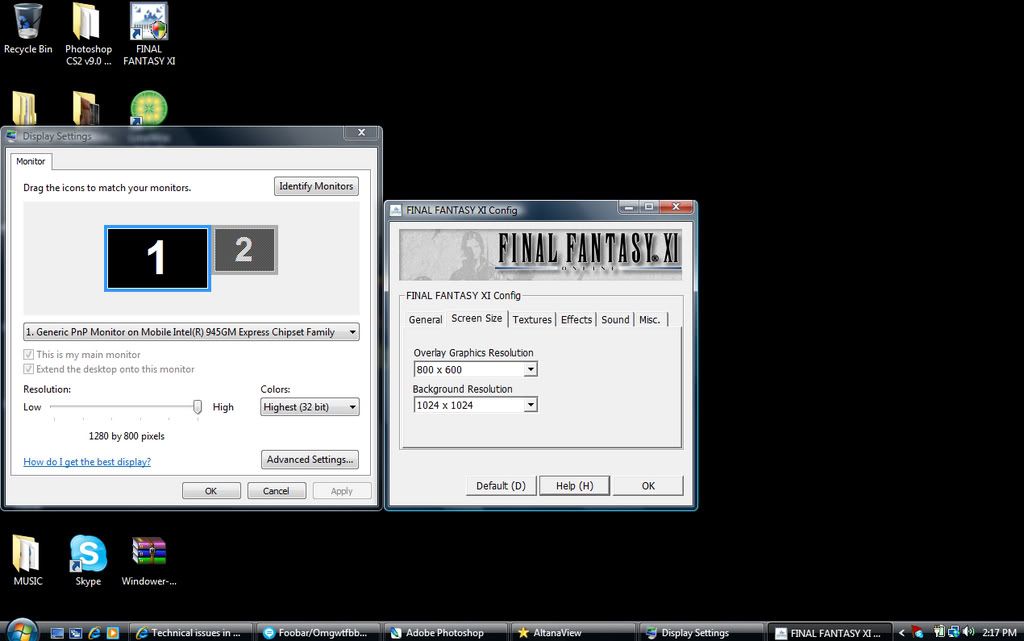
              I went to FFXI Config, and i didnt see Display Resolution but i got:

              Overlay Graphics Resolution:
              800x600

              Background Resolution:
              1024x1024

              I hope that answered your question?

              And thanks again Icemage
              62Dancer | 75Corsair | 75Beastmaster | 75Paladin | 75Bard


              Your resource for FFXI Farming

              Comment


              • #22
                Re: Technical issues in Campaign

                Hmm, yeah it certainly does look like you have enough RAM and CPU power to play. I think I agree with Icemage, probably is your card. Did you try what I suggested earlier with "raid settings" yet? Turning things off might help. Or at least give you a longer time til your card begins overheating or making errors.

                Do you know what kind of laptop you have? You might want to browse that company website and see if they offer vid-card upgrades for your machine. Another idea is to flip the lappy over and see if there's a slot in about the center of the back. Pretty sure that's where my lappy's video card plugs in. If you have a compartment there, it likely means you have upgrade capability. Which would mean it's technically possible to buy an upgraded card, plug it in, and disable the onboard video card. Wouldn't be as easy as just replacing a card, but we could probably walk you through the process.

                Be the Ultimate Ninja! Play Billy Vs. SNAKEMAN today!

                Comment


                • #23
                  Re: Technical issues in Campaign

                  Originally posted by Selphiie The Enchantress View Post
                  I went to FFXI Config, and i didnt see Display Resolution but i got:

                  Overlay Graphics Resolution:
                  800x600

                  Background Resolution:
                  1024x1024

                  I hope that answered your question?

                  And thanks again Icemage
                  Interesting.

                  Your specs indicate:

                  Graphics Card = Mobile Intel(R) 945GM Express Chipset Family
                  Type of Chip = UnKnown Video Chip

                  Basically what this tells me is that your laptop is relying on the internal hardware supplied by Intel for graphics display.

                  The bad news is that according the spec sheet for the 945GM series hardware, the internal graphics display hardware isn't very robust. I'm surprised you can even run FFXI at all, to be perfectly honest.

                  Unfortunately without a way to upgrade the hardware (the 945GM does support upgraded video cards, but it's up to the manufacturer to allow it on their boards and cases), you're kind of stuck hardware wise.

                  There's basically two practical things we can do at this point:

                  IF you are using Windowed mode, then you're ok, but if you're not using Windowed mode:
                  (1) Change your display resolution to match that of your actual laptop screen. This reduces the load on the video card, since it doesn't have to do scaling.

                  Whether you are using Windowed mode or not:
                  (2) Change the background resolution to a lower setting. This will "blur" a lot of objects in-game, but may reduce the workload on your video hardware.

                  I used to change the Background Resolution down a lot to handle display lag on my computer in places like Dynamis (I still do, in fact - I've got a newer computer that handles everything flawlessly, but I haven't migrated FFXI over to it yet).

                  You can also try turning off Bump Mapping in FFXI Config (under Effects tab) if it's on. That will reduce the load some more.


                  Icemage

                  Comment


                  • #24
                    Re: Technical issues in Campaign

                    </3 most laptops' inability to be easily upgraded x_x

                    This is most probably an issue with your graphics card as people have stated.

                    Isnt her ram kinda odd? Seems like its corrupt, 2038mb? Dunno if that's any indication but corrupt memory = ouch.
                    signatures are for pussies mew mew mew, here's mine

                    Comment


                    • #25
                      Re: Technical issues in Campaign

                      Theres a little sticker on the laptop that says:
                      Intel Centrino Duo

                      Idk if that helps at all.

                      Also, if it makes ANY difference at all i use .net Windower instead of the official Windower only because the official windower sucks and whenever i minimize it to do other things while LFP or something itll lock me in place for like 5 seconds when i un~minimize it, unless theres a way to change that ill stick with .net. I won't go full screen either only because i like browsing the internet/doing photoshop while i play FFXI.

                      But idk if using Windower is the problem, im just oblivious. lol.
                      62Dancer | 75Corsair | 75Beastmaster | 75Paladin | 75Bard


                      Your resource for FFXI Farming

                      Comment


                      • #26
                        Re: Technical issues in Campaign

                        Originally posted by Selphiie The Enchantress View Post
                        Theres a little sticker on the laptop that says:
                        Intel Centrino Duo

                        Idk if that helps at all.

                        Also, if it makes ANY difference at all i use .net Windower instead of the official Windower only because the official windower sucks and whenever i minimize it to do other things while LFP or something itll lock me in place for like 5 seconds when i un~minimize it, unless theres a way to change that ill stick with .net. I won't go full screen either only because i like browsing the internet/doing photoshop while i play FFXI.

                        But idk if using Windower is the problem, im just oblivious. lol.
                        If you're using the third party windower, that could be causing some of your issues, since I believe it puts even more pressure on your video card since it is now scaling the output (again), and is much less efficient than running FFXI on the native client.

                        Unfortunately, that may be something you'll have to live with, since there's no way around this problem.


                        Icemage

                        Comment


                        • #27
                          Re: Technical issues in Campaign

                          Alright Icemage i'll use the official windower, although, idk what to do as far as resolution and all that, i screenshotted it maybe you can take a look at it

                          62Dancer | 75Corsair | 75Beastmaster | 75Paladin | 75Bard


                          Your resource for FFXI Farming

                          Comment


                          • #28
                            Re: Technical issues in Campaign

                            Originally posted by Selphiie The Enchantress View Post
                            Theres a little sticker on the laptop that says:
                            Intel Centrino Duo
                            Not really, I was thinking more along the lines of Dell, Hewlett Packard or Lenovo. Who'd you buy it from? That'd be where I'd start looking.

                            @Icemage No, windower doesn't scale. You have to go in and manually change the ingame resolutions by editing the .ini files. Making mistakes here causes odd shaped windows or parts of it to appear offscreen. Sometimes if you pop in an unsupported resolution nothing will show up at all. My understanding of it is the code basically sets up a .bat file that runs when you start up, creates a window of so many pixels by so many pixels, and then tells FFXI that this is the screen size and the screen is located in this window when it queries the system. It could be more complex if it wanted to be, but the core of the app is basically Windows 98 code, since that was the first OS it had to work with.

                            Be the Ultimate Ninja! Play Billy Vs. SNAKEMAN today!

                            Comment


                            • #29
                              Re: Technical issues in Campaign

                              Theres a sticker on the bottom of the laptop that says Gateway

                              Is that it?
                              62Dancer | 75Corsair | 75Beastmaster | 75Paladin | 75Bard


                              Your resource for FFXI Farming

                              Comment


                              • #30
                                Re: Technical issues in Campaign

                                Originally posted by Kitalrez View Post
                                @Icemage No, windower doesn't scale. You have to go in and manually change the ingame resolutions by editing the .ini files. Making mistakes here causes odd shaped windows or parts of it to appear offscreen. Sometimes if you pop in an unsupported resolution nothing will show up at all. My understanding of it is the code basically sets up a .bat file that runs when you start up, creates a window of so many pixels by so many pixels, and then tells FFXI that this is the screen size and the screen is located in this window when it queries the system. It could be more complex if it wanted to be, but the core of the app is basically Windows 98 code, since that was the first OS it had to work with.
                                The unofficial windower most certainly does scale. The borders are draggable, and if you try pulling click-dragging the bottom or right edges, it will scale the image to whatever your new window size is.

                                Making changes to the configuration changes what the internal rendering in the game client outputs, but the windower app itself does some sort of scaling on its own.


                                Icemage

                                Comment

                                Working...
                                X