Announcement

Collapse
No announcement yet.

Technical issues in Campaign

Collapse
X
 
  • Filter
  • Time
  • Show
Clear All
new posts

  • Jaice
    replied
    Re: Technical issues in Campaign

    Originally posted by Selphiie The Enchantress View Post
    I have a fan on in the room, but the laptop is near my window because i like to watch the every day happenins of the outside world while im on my PC to kind of keep myself in reality check. There is a world outside FFXI! lol
    There's a small fan inside of your computer near where your power cord goes and possibly one nearer your processor (I havent had anyone willing to let me open their laptop recently to check )

    If the bottom of your laptop near your fan outlet (vents on the back/side/bottom) on the laptop (it better be the back..... if they put the fan port on the bottom of your computer you'll have to put it on a stand to let it vent properly) check to see if it gets abnormally hot when you are in the situation before your game crashes, it could be the computer telling the game to go away before the entire computer shuts off.

    If there's too much heat in your computer it will cause major problems.

    Leave a comment:


  • Selphiie The Enchantress
    replied
    Re: Technical issues in Campaign

    I've had them turned down for awhile now, but it still crashes me, I even turned down the animation frame rate to the point where everyones running around like 8-bit characters, and i still crash...

    /sigh

    Leave a comment:


  • Kitalrez
    replied
    Re: Technical issues in Campaign

    It should work, both your resolution for the game and your background resolution are smaller than the resolution of your desktop, meaning the game window is small enough to be completely displayed on it. You could probably go a little bigger if you wanted, but let's not stress your card any more than it might already be. Did turning down the ingame settings work, BTW?

    Leave a comment:


  • Selphiie The Enchantress
    replied
    Re: Technical issues in Campaign

    Originally posted by Kitalrez View Post
    Well, I'd pick a resolution that's smaller than whatever your desktop size is. For instance you might want to play at 800X600 if your Desktop is 1040X680, etc. This way you open a window to run the game in that is smaller than the total screen area, so you can still run background applications, surf the net, etc.
    Was that screenshot i posted on Page 2 fine? I got the background resolution of my monitor and what i use for windower, it doesnt match, but idk what to do with it.

    Is your powersupply or area near your fan on your laptop getting hotter than ususal when this happens in the game?
    I have a fan on in the room, but the laptop is near my window because i like to watch the every day happenins of the outside world while im on my PC to kind of keep myself in reality check. There is a world outside FFXI! lol...

    lowering your resolution and turning off effects that you dont need are fantastic ways to minimilize how much of your processor is running the game (thank you to everyone that filled her in on how to do that!!)
    I turned off as many effects as i could, turned down character models displayed, turned off shadows, turned off weather effects, etc, and it still does this ;_;

    Leave a comment:


  • Jaice
    replied
    Re: Technical issues in Campaign

    Sorry it's taken me so long to get this on the forums but I'm trying to formulate a picture of what the issue is while I'm at work >.> shhh... Technojargen away!!


    Reading through the current list of problems you are having and looking at your computer specs you are using an intergrated video card that came with your laptop (It cant be removed) - It's possible the strain on the processor being tied into the graphics card is overstressing the Cache inside of your motherboard causing it to release the information for FFXI and shut it down before harming the system - lowering your resolution and turning off effects that you dont need are fantastic ways to minimilize how much of your processor is running the game (thank you to everyone that filled her in on how to do that!!)

    Is your powersupply or area near your fan on your laptop getting hotter than ususal when this happens in the game?

    Another cause to this might be Vista as well, if you are able to get a copy of XP and run everything you hold dear using that I'd recomend it, the best course of action i've found for Vista is at least 3gigs of dual channel memory (The stuff that makes programs run fastah!) and I dont believe you can get that on a laptop.

    With your specs and XP as an operating system you should be able to run everything flawlessly.

    Originally posted by Selphiie The Enchantress View Post
    But idk if using Windower is the problem, im just oblivious. lol.
    The only thing I can think in response to being locked when you alt+tab back from the SE windower is the window isnt actually selected, you need to click your mouse on the program to put it in the list of priorities and make it active. Mine does the same thing.

    Originally posted by Balfree View Post
    Isnt her ram kinda odd? Seems like its corrupt, 2038mb? Dunno if that's any indication but corrupt memory = ouch.
    Ahh that's the fun part! The BiIOS actually steals a bit of ram on start up to create virtual shell and allow the computer (actually kind of tricking it) to run it's ram at full capacity, with the 2038 total and 1179 avaliable it's showing how much ram is being used by current programs, if that's on start up it should be the amount that BIOS is using and how much Vista is sucking down to run. *shakes fist*

    Originally posted by Selphiie The Enchantress View Post
    Theres a sticker on the bottom of the laptop that says Gateway
    Is that it?
    That's the company that made your computer the only downside to that is I belive gateway bought out E-Machines (notoriously crappy company for computer parts) ... I think they did anyway... gah! I cant recall ;_;

    I hope this helps at least a little... the only thing I have under my belt is an A+ certification so far for computer repair.

    Leave a comment:


  • Kitalrez
    replied
    Re: Technical issues in Campaign

    Originally posted by Selphiie The Enchantress View Post
    Theres a sticker on the bottom of the laptop that says Gateway

    Is that it?
    Yup, that's the one. You want to check out Gateway's site and see if they sell upgrades for that particular laptop. Once you know what the upgrade is, you could always go online and look for something cheaper, though.

    Ok, I was apparently wrong on the scaling issue. Used to be that doing that broke the program and forced a restart to get it working again. Must've fixed that.
    ______________________________
    Originally posted by Selphiie The Enchantress View Post
    So what should my settings be for the official windower? o.o
    Well, I'd pick a resolution that's smaller than whatever your desktop size is. For instance you might want to play at 800X600 if your Desktop is 1040X680, etc. This way you open a window to run the game in that is smaller than the total screen area, so you can still run background applications, surf the net, etc.
    Last edited by Kitalrez; 03-27-2008, 10:56 AM. Reason: Automerged Doublepost

    Leave a comment:


  • Selphiie The Enchantress
    replied
    Re: Technical issues in Campaign

    So what should my settings be for the official windower? o.o

    Leave a comment:


  • Icemage
    replied
    Re: Technical issues in Campaign

    Originally posted by Kitalrez View Post
    @Icemage No, windower doesn't scale. You have to go in and manually change the ingame resolutions by editing the .ini files. Making mistakes here causes odd shaped windows or parts of it to appear offscreen. Sometimes if you pop in an unsupported resolution nothing will show up at all. My understanding of it is the code basically sets up a .bat file that runs when you start up, creates a window of so many pixels by so many pixels, and then tells FFXI that this is the screen size and the screen is located in this window when it queries the system. It could be more complex if it wanted to be, but the core of the app is basically Windows 98 code, since that was the first OS it had to work with.
    The unofficial windower most certainly does scale. The borders are draggable, and if you try pulling click-dragging the bottom or right edges, it will scale the image to whatever your new window size is.

    Making changes to the configuration changes what the internal rendering in the game client outputs, but the windower app itself does some sort of scaling on its own.


    Icemage

    Leave a comment:


  • Selphiie The Enchantress
    replied
    Re: Technical issues in Campaign

    Theres a sticker on the bottom of the laptop that says Gateway

    Is that it?

    Leave a comment:


  • Kitalrez
    replied
    Re: Technical issues in Campaign

    Originally posted by Selphiie The Enchantress View Post
    Theres a little sticker on the laptop that says:
    Intel Centrino Duo
    Not really, I was thinking more along the lines of Dell, Hewlett Packard or Lenovo. Who'd you buy it from? That'd be where I'd start looking.

    @Icemage No, windower doesn't scale. You have to go in and manually change the ingame resolutions by editing the .ini files. Making mistakes here causes odd shaped windows or parts of it to appear offscreen. Sometimes if you pop in an unsupported resolution nothing will show up at all. My understanding of it is the code basically sets up a .bat file that runs when you start up, creates a window of so many pixels by so many pixels, and then tells FFXI that this is the screen size and the screen is located in this window when it queries the system. It could be more complex if it wanted to be, but the core of the app is basically Windows 98 code, since that was the first OS it had to work with.

    Leave a comment:


  • Selphiie The Enchantress
    replied
    Re: Technical issues in Campaign

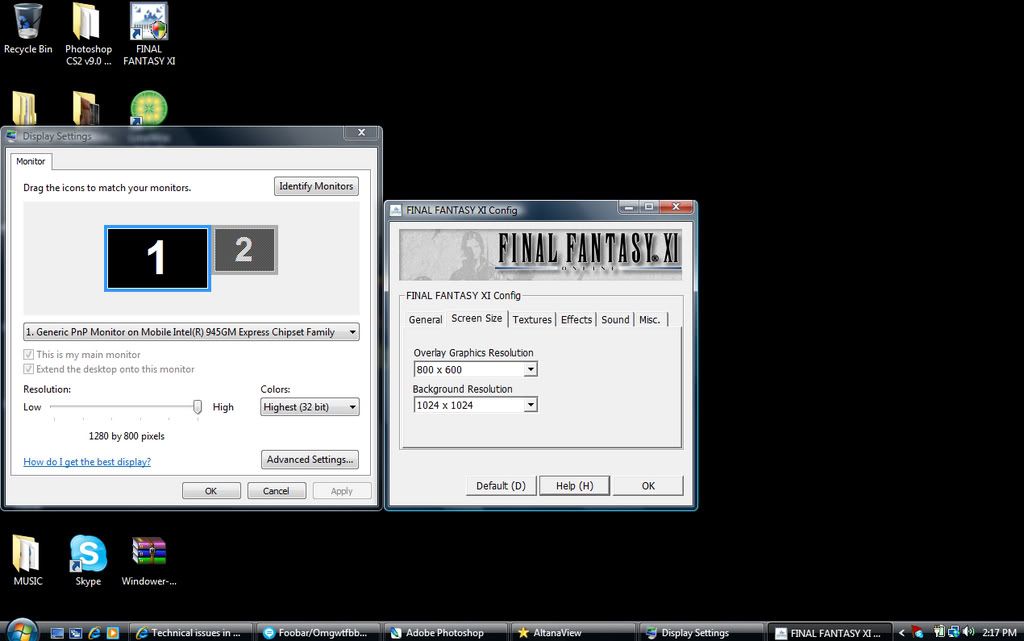
    Alright Icemage i'll use the official windower, although, idk what to do as far as resolution and all that, i screenshotted it maybe you can take a look at it

    Leave a comment:


  • Icemage
    replied
    Re: Technical issues in Campaign

    Originally posted by Selphiie The Enchantress View Post
    Theres a little sticker on the laptop that says:
    Intel Centrino Duo

    Idk if that helps at all.

    Also, if it makes ANY difference at all i use .net Windower instead of the official Windower only because the official windower sucks and whenever i minimize it to do other things while LFP or something itll lock me in place for like 5 seconds when i un~minimize it, unless theres a way to change that ill stick with .net. I won't go full screen either only because i like browsing the internet/doing photoshop while i play FFXI.

    But idk if using Windower is the problem, im just oblivious. lol.
    If you're using the third party windower, that could be causing some of your issues, since I believe it puts even more pressure on your video card since it is now scaling the output (again), and is much less efficient than running FFXI on the native client.

    Unfortunately, that may be something you'll have to live with, since there's no way around this problem.


    Icemage

    Leave a comment:


  • Selphiie The Enchantress
    replied
    Re: Technical issues in Campaign

    Theres a little sticker on the laptop that says:
    Intel Centrino Duo

    Idk if that helps at all.

    Also, if it makes ANY difference at all i use .net Windower instead of the official Windower only because the official windower sucks and whenever i minimize it to do other things while LFP or something itll lock me in place for like 5 seconds when i un~minimize it, unless theres a way to change that ill stick with .net. I won't go full screen either only because i like browsing the internet/doing photoshop while i play FFXI.

    But idk if using Windower is the problem, im just oblivious. lol.

    Leave a comment:


  • Balfree
    replied
    Re: Technical issues in Campaign

    </3 most laptops' inability to be easily upgraded x_x

    This is most probably an issue with your graphics card as people have stated.

    Isnt her ram kinda odd? Seems like its corrupt, 2038mb? Dunno if that's any indication but corrupt memory = ouch.

    Leave a comment:


  • Icemage
    replied
    Re: Technical issues in Campaign

    Originally posted by Selphiie The Enchantress View Post
    I went to FFXI Config, and i didnt see Display Resolution but i got:

    Overlay Graphics Resolution:
    800x600

    Background Resolution:
    1024x1024

    I hope that answered your question?

    And thanks again Icemage
    Interesting.

    Your specs indicate:

    Graphics Card = Mobile Intel(R) 945GM Express Chipset Family
    Type of Chip = UnKnown Video Chip

    Basically what this tells me is that your laptop is relying on the internal hardware supplied by Intel for graphics display.

    The bad news is that according the spec sheet for the 945GM series hardware, the internal graphics display hardware isn't very robust. I'm surprised you can even run FFXI at all, to be perfectly honest.

    Unfortunately without a way to upgrade the hardware (the 945GM does support upgraded video cards, but it's up to the manufacturer to allow it on their boards and cases), you're kind of stuck hardware wise.

    There's basically two practical things we can do at this point:

    IF you are using Windowed mode, then you're ok, but if you're not using Windowed mode:
    (1) Change your display resolution to match that of your actual laptop screen. This reduces the load on the video card, since it doesn't have to do scaling.

    Whether you are using Windowed mode or not:
    (2) Change the background resolution to a lower setting. This will "blur" a lot of objects in-game, but may reduce the workload on your video hardware.

    I used to change the Background Resolution down a lot to handle display lag on my computer in places like Dynamis (I still do, in fact - I've got a newer computer that handles everything flawlessly, but I haven't migrated FFXI over to it yet).

    You can also try turning off Bump Mapping in FFXI Config (under Effects tab) if it's on. That will reduce the load some more.


    Icemage

    Leave a comment:

Working...
X