Announcement

Collapse
No announcement yet.

Technical issues in Campaign

Collapse
X
 
  • Filter
  • Time
  • Show
Clear All
new posts

  • Selphiie The Enchantress
    replied
    Re: Technical issues in Campaign

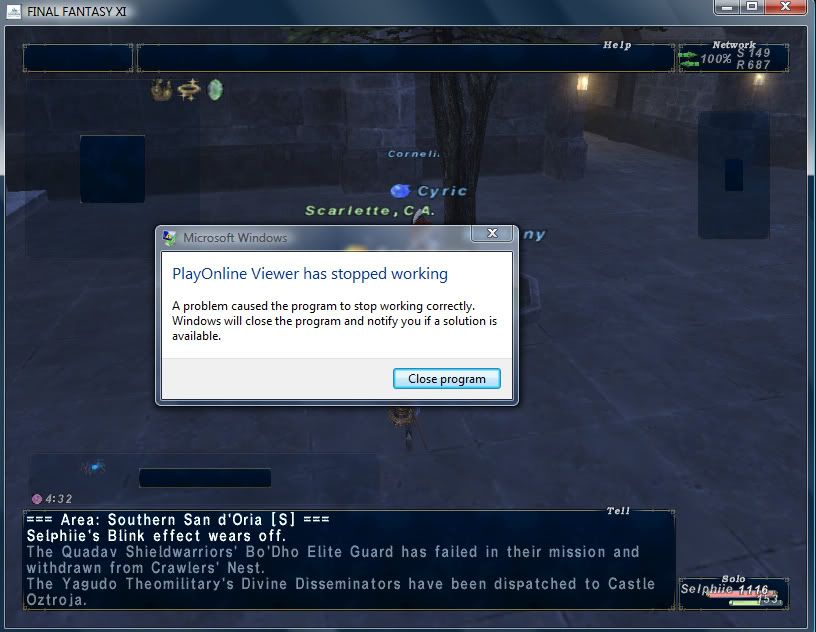
    This actually only happens during really graphically intense situations (Einherjar, Dynamis, Campaign)

    I updated the graphic driver, im using the intel one, idk if theres any better options but thats all i got to work with. Did a campaign, warped back, and still got the error message...

    Although this time it didnt come with the message "Your display driver stopped working"

    (this is the official windower)
    Leave a comment:


  • Jaice
    replied
    Re: Technical issues in Campaign

    Originally posted by Mhurron View Post
    Not every graphics system is going to return 2 values or any of those values. The video chip is a Mobile 945GM. It's not a card that has a 945 it is a 945; it's not like my 8600GT which is a 8600GT card but the chip is actually called G84, though even then I believe the nvidia drivers would report 8600GT for both those values.
    Ahhhh, that explains it. I've honestly never seen that value blank. Every computer I've worked on has had a non-intergrated graphics card allowing for the 2nd value.

    Leave a comment:


  • Mhurron
    replied
    Re: Technical issues in Campaign

    Originally posted by Jaice View Post
    "Graphics Card = Mobile Intel(R) 945GM Express Chipset Family"
    "Type of Chip = UnKnown Video Chip" <- That scares me.
    Not every graphics system is going to return 2 values or any of those values. The video chip is a Mobile 945GM. It's not a card that has a 945 it is a 945; it's not like my 8600GT which is a 8600GT card but the chip is actually called G84, though even then I believe the nvidia drivers would report 8600GT for both those values.

    Leave a comment:


  • Jaice
    replied
    Re: Technical issues in Campaign

    Things I wanna know:

    How long have you been running FFXI on your computer?
    Is your computer heating up before it crashes?

    The things that we do know: o.o

    Your computer isnt fried.
    Your video card only showed this issue within a selected situation.
    You've ran the game before just fine. (Have you tried going to a Campain before this?)
    Your video card is a physical part of your motherboard (i.e. not the greatest)
    You run Windows Vista w/2gig of ram and a Dual Core Intel Processor 1.6g.
    "Graphics Card = Mobile Intel(R) 945GM Express Chipset Family"
    "Type of Chip = UnKnown Video Chip" <- That scares me.

    Possible Solutions:
    Updating your video drivers.
    Re-installing your windower (files may have gotten misplaced when
    it crashed and continued to crash)

    More to come.... I hope It seems like this should be a hardware problem (graphic card) but it's acting like a software problem (same issue over and over)


    With the windower question...
    When ever I go to a website and back to FFXI using alt+tab or clicking on the bar at the bottom of the screen I need to click on the game again to make sure the computer knows that's what I want to do.

    ~~I'll be able to be a lot more help when I can get on my computer at home after class. I have vista on my computer and can freely look up related issues w/o getting in trouble by my boss xD ~~
    Last edited by Jaice; 03-27-2008, 01:50 PM.

    Leave a comment:


  • Raydeus
    replied
    Re: Technical issues in Campaign

    After it installs the driver and you restart your PC you should be able to see the new version of the driver in display properties.

    Leave a comment:


  • Jaice
    replied
    Re: Technical issues in Campaign

    Go into the folder where you saved the file and see if a driver install program is there.

    Leave a comment:


  • Selphiie The Enchantress
    replied
    Re: Technical issues in Campaign

    Ok downloaded the driver and restarted my PC, how do i know if its downloaded?

    Leave a comment:


  • Mhurron
    replied
    Re: Technical issues in Campaign

    Originally posted by Selphiie The Enchantress
    Centrino
    Originally posted by Kitalrez View Post
    Not really
    Actually, it does. Centrino is a very specific brand. If you know one component, you know what a number of the other important parts are.

    I'm surprised it works at all. Not all 945's and 950's support HW TnL.

    Leave a comment:


  • Selphiie The Enchantress
    replied
    Re: Technical issues in Campaign

    Yeah, but no luck, i actually got the driver to start updating, i just clicked the wrong link >.<;


    Gotta restart the pc cuz it keeps flickering. brb

    Leave a comment:


  • Raydeus
    replied
    Re: Technical issues in Campaign

    Oh crap, the new driver doesn't support Windows NT, only Vista and XP.

    Have you tried running the game without the windower (and full screen) at 1280x800 overlay yet?

    Leave a comment:


  • Selphiie The Enchantress
    replied
    Re: Technical issues in Campaign

    Thanks Raydeus, im downloading it now, had to turn close alot of my programs including photoshop and viewer until i can get this sorted out.

    (...sorry Feba ;

    Ok... i tried downloading it but then i get an error message saying, "The driver being installed is not validated for this computer"

    >.< idk what im doing lol. Im following exactly what people are telling me to do.

    Leave a comment:


  • Raydeus
    replied
    Have you tried running XI with an overlay resolution of 1280 x 800?

    I know it sounds weird but specially on this kind of displays using a resolution other than the native resolution causes more performance problems than the performance boost you get from running the game at a lower resolution.

    (Edit > Never mind, 945GM is the graphic's chip model right?)

    A friend of mine had problems with his laptop not so long ago (the crashing blue screen of doom kind) because his onboard graphics card was intel (not Nvidia nor ATI, In-freaking-tel) it took him quite a while to fix it but he was able to at the end.

    You can download the lastest driver from Intel's site click here in case you don't have it yet. (945GM)


    (Edit > Gah it is my destiny to never have an auto-merge 2 post combo ever again isn't it. ; ; )
    Last edited by Omniblast; 03-27-2008, 04:03 PM. Reason: because merging is prettier...

    Leave a comment:


  • Selphiie The Enchantress
    replied
    Re: Technical issues in Campaign

    Originally posted by Jaice View Post
    The only thing I can think in response to being locked when you alt+tab back from the SE windower is the window isnt actually selected, you need to click your mouse on the program to put it in the list of priorities and make it active. Mine does the same thing.
    I don't really get what you mean by this o.o;

    I'm trying out the official windower and amazingly survived a laggy Grauberg campaign with alot of effects turned off (shadows,weather, etc)

    The only thing is when i minimize the official windower to say come on the forums and i go to un minimize it, im locked in place for like 5 seconds and cant do anything. Is there a way to get around this?

    Also it seems as if the official windower eats up alot of my system or whatever, because now whenever i type the letters appear like 5 seconds after i type it out.

    o.o; I sure do miss distance, im going to see if i can push my luck with more campaigns with the official windower, if it solves my POL Crashing problems then i guess i have to live without plugins and not being able to minimize it (unless theres a way around it)
    ______________________________
    Nope... didn't solve a thing, i got through one Grauberg Campaign and i was like "OMG YAY FINALLY"

    Second Grauberg campaign rolls around, and everything seems fine... and then all of a sudden my whole screen goes completely black.

    Then it recovers saying "Your display driver has stopped working" and it crashes my OFFICIAL windower. I don't get it, ive turned down the effects on the game to the point where i feel like im playing a Nintendo 64, how is it still too graphic intensive?
    Last edited by Selphiie The Enchantress; 03-27-2008, 12:34 PM. Reason: Automerged Doublepost

    Leave a comment:


  • Jaice
    replied
    Re: Technical issues in Campaign

    Originally posted by Kitalrez View Post
    There's usually one near the processor, too. (I got bored one day, and hey, I have screwdrivers and anti-static wristbands...). It blows the air from the processor towards the other fan/vents or out its own vent. Sometimes they have a nice ducting array in there to focus the warm air out.
    Ha! Awesome! Thank you. The main thing that prevents me from buying a laptop is the over heating issues, I've seen more than a few where the vent blowing the warm/hot air out of the lap top is put on the bottom of the computer.... seriously.... wtf over? How can hot air vent from a computer system sitting on a desk/table if the vent is on the bottom? >.< I swear... for the sake of astetics people are willing to accomidate for a lot.

    Leave a comment:


  • Kitalrez
    replied
    Re: Technical issues in Campaign

    There's usually one near the processor, too. (I got bored one day, and hey, I have screwdrivers and anti-static wristbands...). It blows the air from the processor towards the other fan/vents or out its own vent. Sometimes they have a nice ducting array in there to focus the warm air out.

    Leave a comment:

Working...
X