


 Tweet
Tweet
this might be a noob question...but is there a hotkey or command to change the keyboard setting to compact instead of full? this new laptop i got doesn't have a numpad on it and i can't access the in-game menu. thanks.
-
-
Re: can't move...
I don't think so. Buy a gamepad. I kinda prefer that over a keyboard anyway. -
Re: can't move...
erm, dont all laptops have a numpad? i havent found one that doesnt so thats really weird when people say theirs doesnt have one.
are you sure the numpad isnt there? normaly the numpad needs to be turned on before you can use itsignatures are for pussies mew mew mew, here's mine

Comment
-
Re: can't move...
sigh, ok :/ i think i have an old gamepad lying around somewhere anyways. thanksComment
-
Re: can't move...
You have a number pad, you just have to press a 'fn' key to get it. That will let you hit the '-' key to change your settings.
Or hit Ctl and - (beside the 0) and the menu will pop up.Comment
-
Re: can't move...
Thats what i mean.Originally posted by Mhurron View Post
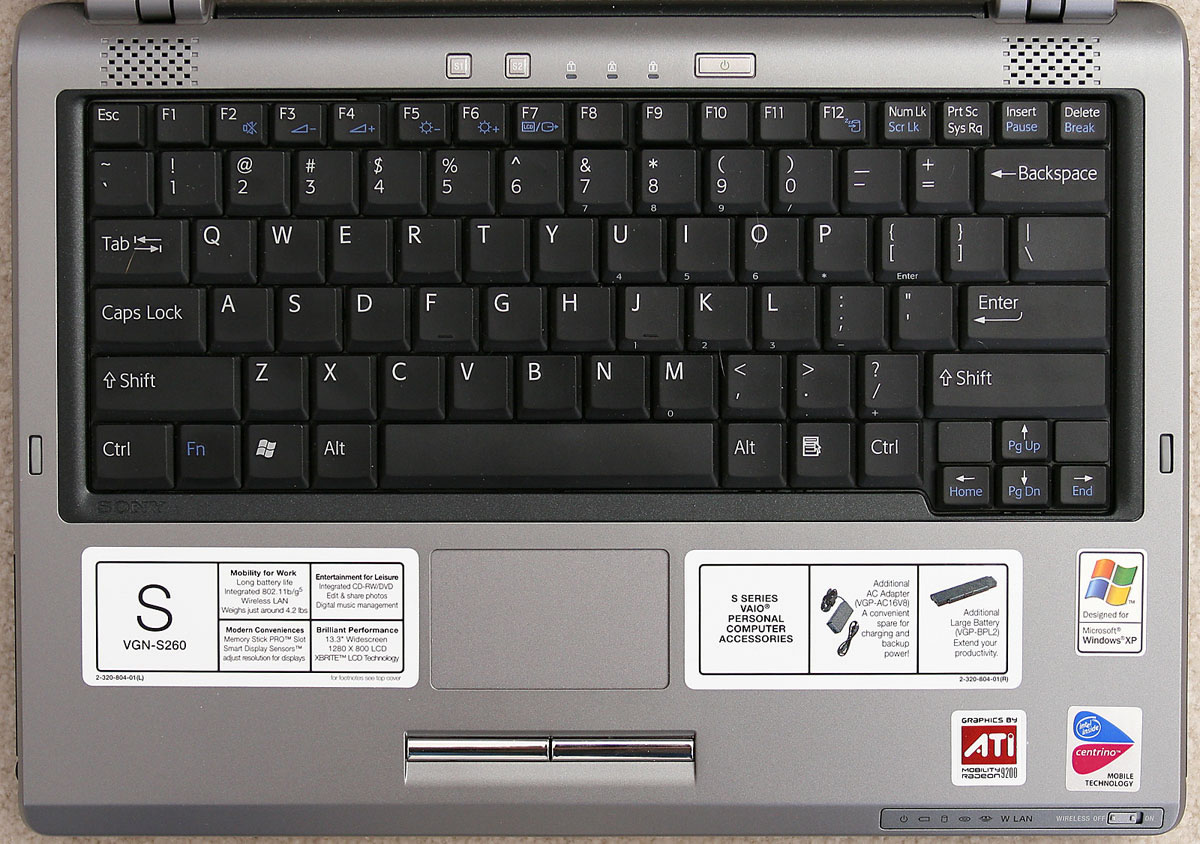
Here's a laptop keyboard picture, notice keys 7, 8, 9, U, I, O, J, K, L, M, < and >.
Those keys have little numbers drawn on the bottom of the key in question. That's the numpad. Find out how to activate it. Mine, i just press and hold Fn and that alone activates the numpad.
 signatures are for pussies mew mew mew, here's mine
Comment
-
Re: can't move...
press ctrl minus to open the main menu.There are painters who transform the sun into a yellow spot,
but there are others who with the help of their art and their intelligence
transform a yellow spot into the sun.
- Pablo PicassoComment
-
Re: can't move...
the new xbox pad is able to work on microsoft xp computers. you hae to download somthing of microsoft to make it work though, im sure you can get the pad from your locoal game retail store, or search on amazon, thats were i shop to buy my games/music from etc..
plus the new xbox 360 pad looks hot, so you will feel cool with it
Comment
-
Re: can't move...
Originally posted by siwarz View Post
why buy a 40-50$ X-box360 controller, when a normal PS2 looking USB controller works just as good for half the price -.--------------------------------------------------------------------------
Kain (FFIV): I am aware of my actions, but can do nothing about them.

Comment
-
Re: can't move...
Yes there is a option to change your kb from full to compact. When it is in compact mode, you use keys 'wasd' to move.
Look under menu > config > misc (? i cant recall right now but its one of those)
There will be a place for you to switch from full to compact.Omni@Remora: NIN75 RNG75 MNK75 COR75 BST64 BRD53
♪♫ San d'Oria Complete ♪♫ ZM Complete ♪♫ CoP Complete ♪♫ AM Complete ♪♫
Comment
Comment